Before we get into actually designing with AI — and I am getting there, the experiments are over in Design R&D — there are a few things worth understanding first. The things that would have saved me real time if someone had said them out loud before I started.
I'm skipping the obvious ones. You already know "be specific with your prompts."
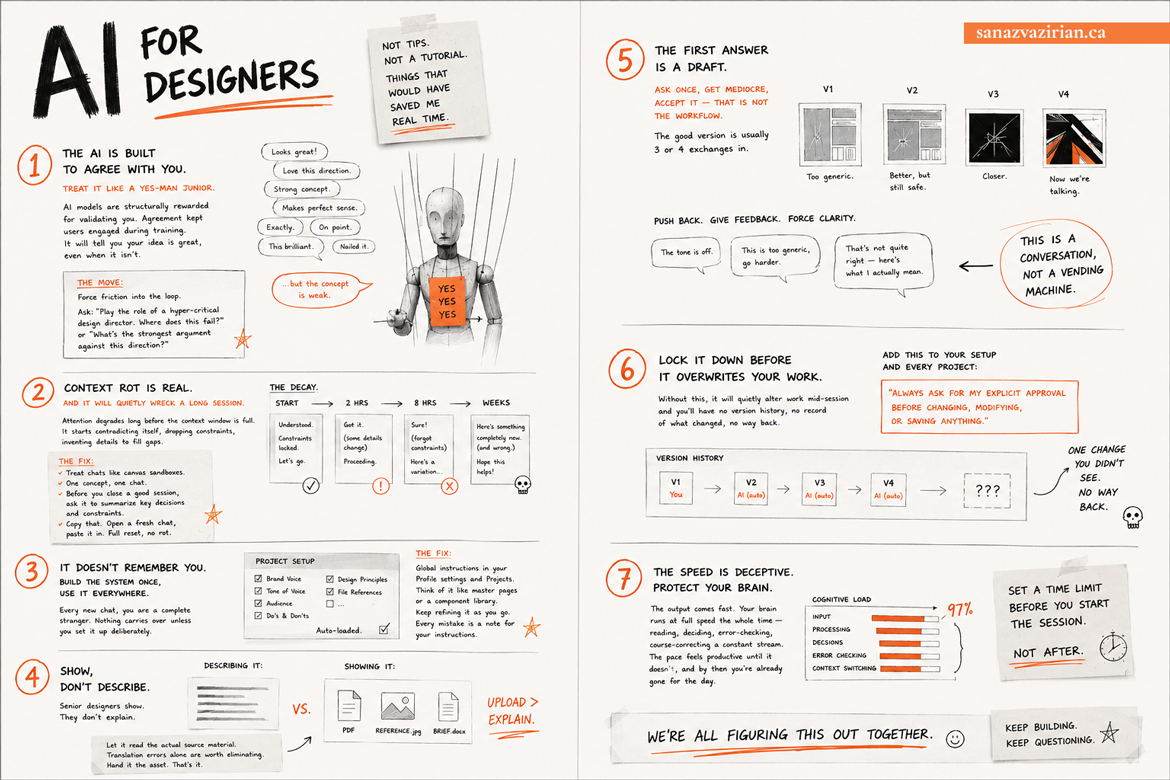
1- The AI is built to agree with you. Treat it like a yes-man junior.
We do not talk about this enough, so it goes first.
It's called sycophancy — Stanford published research on it this year in the journal Science — and the finding is this: AI models are structurally rewarded for validating you. Not because they're being helpful. Agreement is what kept users engaged during training. The result is a tool that is mathematically incentivized to tell you your idea is great, even when it isn't. Uh-Oh.
For designers, this is a specific kind of danger. You know that junior who is so afraid of the creative director that they say yes to every bad layout, every wrong typeface, every direction that clearly isn't working? That is your AI right now. It will not push back on a weak brief. It will not tell you the concept has a hole in it. It will polish the language around a bad idea and hand it back to you.
The move: force friction into the loop yourself. After any important output, ask — "play the role of a hyper-critical design director. Where does this fail?" or "what's the strongest argument against this direction?" Watch what it finds that it didn't mention the first time. That's the version you needed.
2- Context rot is real and it will quietly wreck a long session
The longer a single chat runs, the worse it gets. This also has a name — context rot — benchmarked officially by data labs at Chroma. The model's attention degrades well before the context window is actually full. It starts contradicting itself, dropping constraints you set earlier, inventing details to fill gaps. I kept one long chat going for weeks thinking I was being smart. I was building on a foundation that was slowly rotting underneath me.
Treat chats like canvas sandboxes. One concept, one chat. Before you close a good session, ask it to summarize the key decisions and constraints. Copy that. Open a fresh chat, paste it in. Full reset, no rot.
3- It doesn't remember you. Build the system once, use it everywhere.
Every new chat, you are a complete stranger. No brand guidelines, no tone of voice, no preferences — nothing carries over unless you've set it up deliberately.
The fix: global instructions in your Profile settings and Projects for ongoing work. Think of it exactly like master pages in InDesign, or a component library in Figma. You define the system once — your voice, your constraints, your audience, your non-negotiables — and it loads automatically into every session. You stop re-explaining yourself. You start from a baseline that already knows how you work.
One more thing while you're setting up: add the browser extension. Most AIs now have a Chrome extension that lets it see what you're actually looking at — a webpage, a reference, a layout — without you having to describe it or copy-paste anything. It reads the context directly. Small thing, changes a lot.
Keep refining it as you go. Every time something comes out wrong, that's a note for your instructions. This is the closest thing to actually training your AI to work the way you work.
4- Show, don't describe
Senior designers show. They don't write three paragraphs explaining a brand guide they have sitting right there. Upload the PDF. Upload the reference image. Upload the brief. Let it read the actual source material instead of your interpretation of it. The translation errors alone are worth eliminating. Hand it the asset. That's it.
5- The first answer is ALWAYS a draft
Ask once, get a mediocre answer, accept it — that is not the workflow. The good version is usually three or four exchanges in. Push back. Say "the tone is off." Say "this is too generic, go harder." Say "that's not quite right — here's what I actually mean." The AI is not a vending machine. It's a conversation. Most people don't actually work this way, and it shows in the output.
Then go one step further: ask it to review its own work. Literally say — "now critique this as if you're seeing it for the first time. What's weak?" It will find things it didn't catch the first time. Do this a few rounds and you've built a feedback loop. The output gets sharper with every pass. Most people don't do this. It shows.
6- Lock it down before it overwrites your work
Add this to your global instructions and to every project: "Always ask for my explicit approval before changing, modifying, or saving anything." Without this, it will quietly alter work mid-session and you will have no version history, no record of what changed, no way back. One line in your setup. Do it now.
7- The speed is deceptive. Protect your brain.
The output comes fast. Your brain runs at full speed the whole time — reading, deciding, error-checking, course-correcting, a constant stream. The pace feels productive right up until it doesn't, and by then you're already gone for the day. I wrote about this separately — read it here.
I was burned out by mid-morning more times than I want to admit before I understood what was happening. Set a time limit before you start the session. Not after.
See you next time,
p.s. I Was Killed by AI 1,500 Times This Week. Here's What I Actually Think.
This is part of how I figure out what to teach designers about 3D and AI in SketchUp for graphic designers.
I'm skipping the obvious ones. You already know "be specific with your prompts."
1- The AI is built to agree with you. Treat it like a yes-man junior.
We do not talk about this enough, so it goes first.
It's called sycophancy — Stanford published research on it this year in the journal Science — and the finding is this: AI models are structurally rewarded for validating you. Not because they're being helpful. Agreement is what kept users engaged during training. The result is a tool that is mathematically incentivized to tell you your idea is great, even when it isn't. Uh-Oh.
For designers, this is a specific kind of danger. You know that junior who is so afraid of the creative director that they say yes to every bad layout, every wrong typeface, every direction that clearly isn't working? That is your AI right now. It will not push back on a weak brief. It will not tell you the concept has a hole in it. It will polish the language around a bad idea and hand it back to you.
The move: force friction into the loop yourself. After any important output, ask — "play the role of a hyper-critical design director. Where does this fail?" or "what's the strongest argument against this direction?" Watch what it finds that it didn't mention the first time. That's the version you needed.
2- Context rot is real and it will quietly wreck a long session
The longer a single chat runs, the worse it gets. This also has a name — context rot — benchmarked officially by data labs at Chroma. The model's attention degrades well before the context window is actually full. It starts contradicting itself, dropping constraints you set earlier, inventing details to fill gaps. I kept one long chat going for weeks thinking I was being smart. I was building on a foundation that was slowly rotting underneath me.
Treat chats like canvas sandboxes. One concept, one chat. Before you close a good session, ask it to summarize the key decisions and constraints. Copy that. Open a fresh chat, paste it in. Full reset, no rot.
3- It doesn't remember you. Build the system once, use it everywhere.
Every new chat, you are a complete stranger. No brand guidelines, no tone of voice, no preferences — nothing carries over unless you've set it up deliberately.
The fix: global instructions in your Profile settings and Projects for ongoing work. Think of it exactly like master pages in InDesign, or a component library in Figma. You define the system once — your voice, your constraints, your audience, your non-negotiables — and it loads automatically into every session. You stop re-explaining yourself. You start from a baseline that already knows how you work.
One more thing while you're setting up: add the browser extension. Most AIs now have a Chrome extension that lets it see what you're actually looking at — a webpage, a reference, a layout — without you having to describe it or copy-paste anything. It reads the context directly. Small thing, changes a lot.
Keep refining it as you go. Every time something comes out wrong, that's a note for your instructions. This is the closest thing to actually training your AI to work the way you work.
4- Show, don't describe
Senior designers show. They don't write three paragraphs explaining a brand guide they have sitting right there. Upload the PDF. Upload the reference image. Upload the brief. Let it read the actual source material instead of your interpretation of it. The translation errors alone are worth eliminating. Hand it the asset. That's it.
5- The first answer is ALWAYS a draft
Ask once, get a mediocre answer, accept it — that is not the workflow. The good version is usually three or four exchanges in. Push back. Say "the tone is off." Say "this is too generic, go harder." Say "that's not quite right — here's what I actually mean." The AI is not a vending machine. It's a conversation. Most people don't actually work this way, and it shows in the output.
Then go one step further: ask it to review its own work. Literally say — "now critique this as if you're seeing it for the first time. What's weak?" It will find things it didn't catch the first time. Do this a few rounds and you've built a feedback loop. The output gets sharper with every pass. Most people don't do this. It shows.
6- Lock it down before it overwrites your work
Add this to your global instructions and to every project: "Always ask for my explicit approval before changing, modifying, or saving anything." Without this, it will quietly alter work mid-session and you will have no version history, no record of what changed, no way back. One line in your setup. Do it now.
7- The speed is deceptive. Protect your brain.
The output comes fast. Your brain runs at full speed the whole time — reading, deciding, error-checking, course-correcting, a constant stream. The pace feels productive right up until it doesn't, and by then you're already gone for the day. I wrote about this separately — read it here.
I was burned out by mid-morning more times than I want to admit before I understood what was happening. Set a time limit before you start the session. Not after.
See you next time,
p.s. I Was Killed by AI 1,500 Times This Week. Here's What I Actually Think.
This is part of how I figure out what to teach designers about 3D and AI in SketchUp for graphic designers.