The name set me up to misunderstand it. "Claude Design." So I went in expecting a design tool — type a prompt, get a beautiful image back. That is not what it is. And the gap between what I expected and what it actually does took me a few sessions to see clearly. Once I saw it, my whole way of using the tool changed.
What Claude Design actually is, what it is genuinely good at, the one place it falls apart, and the part at the end that honestly surprised me — the part I keep thinking about.
The word "design" makes you expect the wrong thing
Here is the trap. You read "design," you think Midjourney, you think a generated picture. You ask Claude Design for an image and you get something back that looks like an illustration. Looks fine from far away. Then you look closer.
It is not an image. It is code.
What Claude makes is not a picture made of pixels. It writes SVG — shapes and coordinates, a circle here, a line there, this colour, that angle. A recipe for a drawing, not a photograph of one. When you ask for a person, you get a stick figure made of geometry. When you ask for an illustration, you get flat shapes. Look closely and you can almost see the math underneath.
This is not a bug you can prompt your way around. Claude has no image model inside it. It does not "see" what it is drawing the way a person does — it is a language model writing code that happens to render as a shape. So for icons, simple diagrams, flowcharts, geometric stuff — it works, sometimes surprisingly well. For anything with a human figure, texture, real illustration, a photograph — it simply does not. Stick figures. I am not being unkind, that is the real ceiling.
What Claude Design actually is, what it is genuinely good at, the one place it falls apart, and the part at the end that honestly surprised me — the part I keep thinking about.
The word "design" makes you expect the wrong thing
Here is the trap. You read "design," you think Midjourney, you think a generated picture. You ask Claude Design for an image and you get something back that looks like an illustration. Looks fine from far away. Then you look closer.
It is not an image. It is code.
What Claude makes is not a picture made of pixels. It writes SVG — shapes and coordinates, a circle here, a line there, this colour, that angle. A recipe for a drawing, not a photograph of one. When you ask for a person, you get a stick figure made of geometry. When you ask for an illustration, you get flat shapes. Look closely and you can almost see the math underneath.
This is not a bug you can prompt your way around. Claude has no image model inside it. It does not "see" what it is drawing the way a person does — it is a language model writing code that happens to render as a shape. So for icons, simple diagrams, flowcharts, geometric stuff — it works, sometimes surprisingly well. For anything with a human figure, texture, real illustration, a photograph — it simply does not. Stick figures. I am not being unkind, that is the real ceiling.
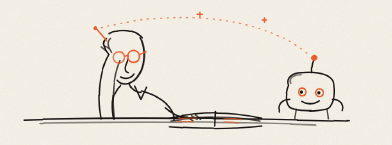
So stop asking it for images. That is the first shift. Once I stopped expecting pictures, I could finally see what it is built for.
What it is actually good at
Claude Design is a language model with a canvas. So it is strongest exactly where language is strong — Writing & Editing, Reasoning & Research, Coding & Data: , Visual Work. Not pictures.
What it does well:
See the pattern? Everything it is good at is a structure made of words and code. Everything that is bad at is images made of pixels. Once that clicked, the whole tool made sense. Use Claude Design for the bones — the layout, the text, the structure. Then bring your images from somewhere else: a real image AI, your own photography, your own illustration. Claude builds the house. You hang the pictures.
Understanding why it behaves this way — that it is a language model writing code, not a visual model painting pixels — is the kind of groundwork I think every designer needs before working with AI. I am collecting these the-penny-dropped moments as part of what I'm building over on Teach; knowing how the thing actually works changes how you use it, every time.
The part that genuinely surprised me: getting your work out alive
Here is where it got interesting, and the real reason I am writing.
The editing inside Claude Design is better than I expected. You are not stuck re-prompting for every small fix. You can click straight onto an element and retype the text, drag things around, resize and realign them — and Claude even builds little sliders for you to nudge colour and spacing live until it feels right. Inline comments let you point at one thing and change just that. So a lot of the refining happens right there on the canvas, before anything leaves. Then, when it is ready, you export.
When a design is ready, there are two ways out — and they are nothing alike.
Way one — Export a file. Claude Design exports as PDF, PowerPoint (editable slides!!), standalone HTML, or a zipped folder.
Way two — send it somewhere alive. This is the part I keep thinking about. Claude Design has a list of connectors it can send to — Canva, Adobe Express, Gamma, Figma-adjacent tools, a whole row of them. Which ones you see depends on what you have connected. I have Canva and Adobe Express, so those are my doors. You send your design across, and it does not land as a flat picture. It lands as editable layers.
Plainly, because this is the whole point: design in Claude, send to Canva, and in Canva you grab any element — drag it, recolour it, retype it, restack it — like it was born there. The code is gone. Real layers now. Nothing to regenerate. Adobe Express does the same trick: your work opens as a native Express document, text and layout intact, ready to brand and finish in tools you already know.
That broke my brain a little. The old complaint about AI design was that it came out locked — a pretty thing you could not touch without starting from zero. This quietly fixes it. The flat file is a door closing. The live send is a door left open.
For a designer who lives in revision — and we all live in revision — that is not a small feature. That is the feature.
What it changed for me
I came in thinking Claude Design was a picture machine, and judged it for being a bad one. Wrong question. It is not a picture machine. It is a structure-and-layout machine with a live bridge into the tools where I actually finish my work.
The small shift, but a real one: I stopped asking "can it make me a beautiful image" and started asking "can it build me a solid, editable starting point I can carry into Canva or Adobe and make mine." Yes. It can. That is a different tool than the one the name promised — and a more useful one than I expected.
If you have been disappointed by the stick figures, you were judging it on the one thing it cannot do. Hand it the structure. Bring your own images. Send it out as live layers, not a flat file. That is the workflow. That is where it earns its place.
What it is actually good at
Claude Design is a language model with a canvas. So it is strongest exactly where language is strong — Writing & Editing, Reasoning & Research, Coding & Data: , Visual Work. Not pictures.
What it does well:
- Text and copy. It writes. That is the core of what Claude is. Headlines, body, microcopy, the words on a slide — solid.
- Layout and typography. It arranges. Hierarchy, spacing, type that sits where it should. This is the part that surprised me most as a designer — it has real instinct for arrangement.
- Presentations. From an outline to a full deck. You can export it as a real PowerPoint, not a flat picture of slides.
- Websites and landing pages. Functional HTML you can actually use. Hero, sections, pricing, the works. It is writing live code, so the page really runs.
See the pattern? Everything it is good at is a structure made of words and code. Everything that is bad at is images made of pixels. Once that clicked, the whole tool made sense. Use Claude Design for the bones — the layout, the text, the structure. Then bring your images from somewhere else: a real image AI, your own photography, your own illustration. Claude builds the house. You hang the pictures.
Understanding why it behaves this way — that it is a language model writing code, not a visual model painting pixels — is the kind of groundwork I think every designer needs before working with AI. I am collecting these the-penny-dropped moments as part of what I'm building over on Teach; knowing how the thing actually works changes how you use it, every time.
The part that genuinely surprised me: getting your work out alive
Here is where it got interesting, and the real reason I am writing.
The editing inside Claude Design is better than I expected. You are not stuck re-prompting for every small fix. You can click straight onto an element and retype the text, drag things around, resize and realign them — and Claude even builds little sliders for you to nudge colour and spacing live until it feels right. Inline comments let you point at one thing and change just that. So a lot of the refining happens right there on the canvas, before anything leaves. Then, when it is ready, you export.
When a design is ready, there are two ways out — and they are nothing alike.
Way one — Export a file. Claude Design exports as PDF, PowerPoint (editable slides!!), standalone HTML, or a zipped folder.
Way two — send it somewhere alive. This is the part I keep thinking about. Claude Design has a list of connectors it can send to — Canva, Adobe Express, Gamma, Figma-adjacent tools, a whole row of them. Which ones you see depends on what you have connected. I have Canva and Adobe Express, so those are my doors. You send your design across, and it does not land as a flat picture. It lands as editable layers.
Plainly, because this is the whole point: design in Claude, send to Canva, and in Canva you grab any element — drag it, recolour it, retype it, restack it — like it was born there. The code is gone. Real layers now. Nothing to regenerate. Adobe Express does the same trick: your work opens as a native Express document, text and layout intact, ready to brand and finish in tools you already know.
That broke my brain a little. The old complaint about AI design was that it came out locked — a pretty thing you could not touch without starting from zero. This quietly fixes it. The flat file is a door closing. The live send is a door left open.
For a designer who lives in revision — and we all live in revision — that is not a small feature. That is the feature.
What it changed for me
I came in thinking Claude Design was a picture machine, and judged it for being a bad one. Wrong question. It is not a picture machine. It is a structure-and-layout machine with a live bridge into the tools where I actually finish my work.
The small shift, but a real one: I stopped asking "can it make me a beautiful image" and started asking "can it build me a solid, editable starting point I can carry into Canva or Adobe and make mine." Yes. It can. That is a different tool than the one the name promised — and a more useful one than I expected.
If you have been disappointed by the stick figures, you were judging it on the one thing it cannot do. Hand it the structure. Bring your own images. Send it out as live layers, not a flat file. That is the workflow. That is where it earns its place.